
MECHSCRIPT.NL • TECHNICAL PRACTICAL GUIDE • OCTOBER 2026
From a two-wire communication bus to Home Assistant. Understand the protocol, choose the right adapter, read faults and temperatures, and build reliable automations—with Brink Renovent, Brink Elan and Vaillant as practical examples.
Many heating and ventilation devices communicate more internal information than their own displays reveal. eBUSd can interpret those messages and make them available through MQTT. That offers insight into temperatures, operating status and fault codes and—if the device and definitions support it—some adjustment options. It is not a universal remote control: capabilities depend on the protocol, device firmware and available message definitions.
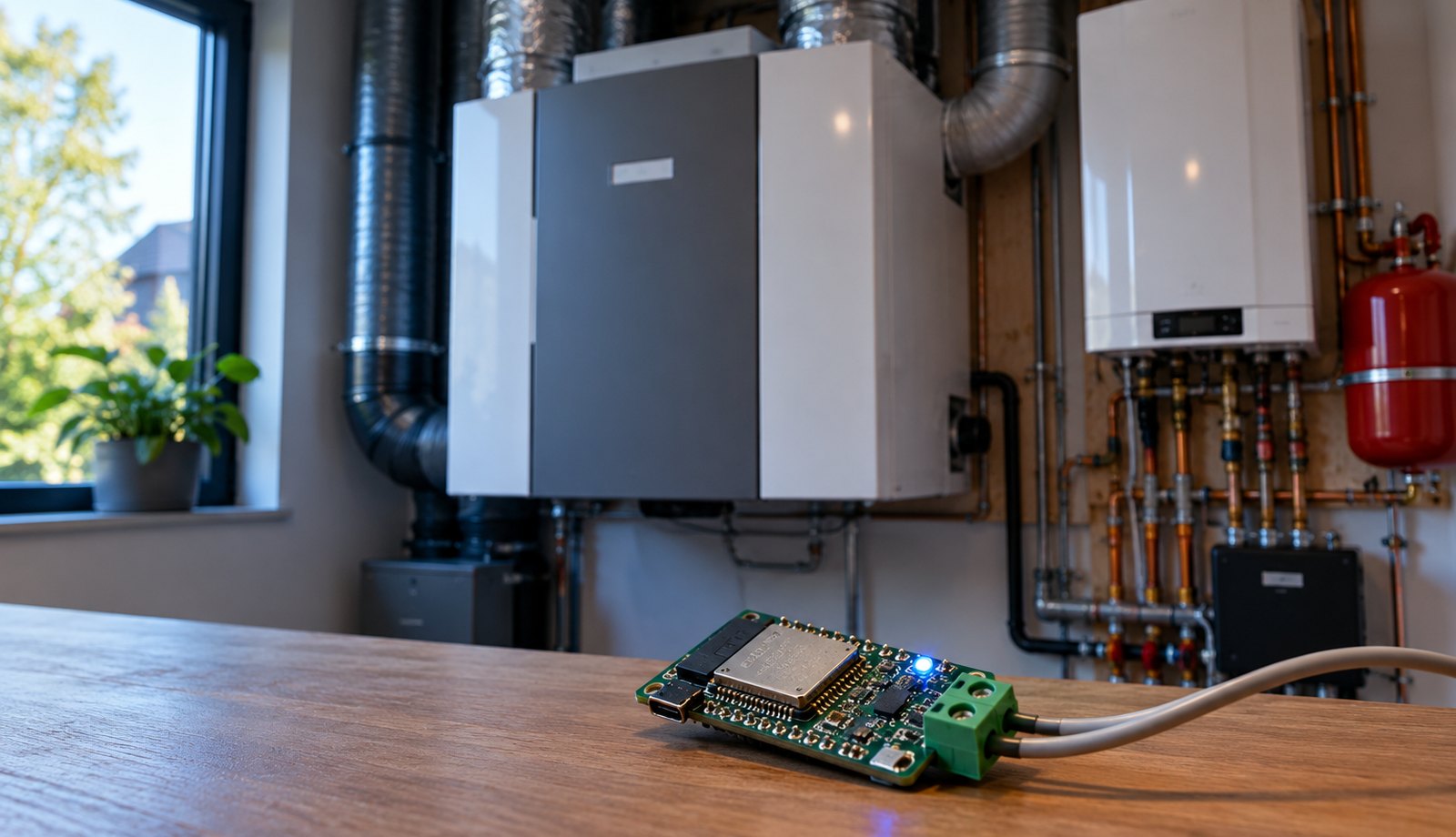
Two wires: physical eBUS connection. USB/network: adapter to host. MQTT: link to Home Assistant.
This article is about the eBUS protocol. Not every two-wire bus is eBUS. OpenTherm, Modbus, EMS, RS485 and manufacturer-specific connectors are not interchangeable by default. Never connect wires merely because a connector looks familiar or its wire colours match.
Contents
- What are eBUS and eBUSd?
- What can eBUSd do?
- Brands and devices
- Checking compatibility
- Choosing hardware
- Connecting safely
- Installation and configuration
- CSV and message definitions
- Brink Renovent in practice
- Brink Elan and combined systems
- Home Assistant and MQTT
- Automations
- Python and AppDaemon
- Diagnosing faults
- Safety and fail-safe behaviour
- Cost and trade-offs
- Reference material and sources
01. What are eBUS and eBUSd?
A communication bus, not a thermostat contact
eBUS is a serial communication bus used in, among other things, heat generators, controllers and certain ventilation units. Multiple bus participants exchange telegrams over two conductors. The installation normally has its own bus supply and a protocol for addressing and avoiding simultaneous transmissions (arbitration). This is quite different from a simple relay contact that is merely open or closed.
eBUSd is the open-source daemon that can receive, interpret and—if configured—send telegrams. An eBUS adapter supplies the electrical interface between the bus and USB or a network. The three components have distinct jobs:
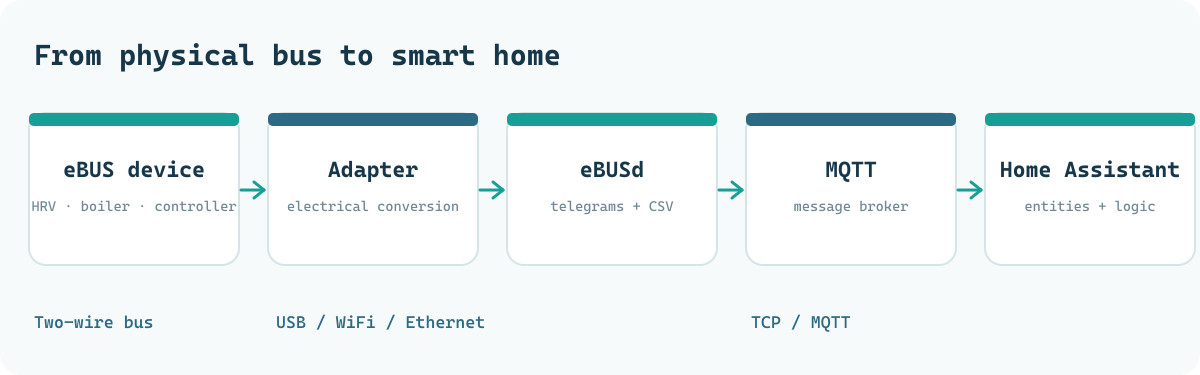
For example, an outdoor temperature may be represented as bytes on the eBUS. Only the correct definition tells eBUSd what message it is, how to convert the bytes, which unit to use and which device the value belongs to.
eBUS, OpenTherm and Modbus: why the distinction matters
| Protocol | Typical use | Important difference |
|---|---|---|
| eBUS | Heating controllers, boilers, ventilation | Manufacturer- and device-specific message definitions |
| OpenTherm | Boiler ↔ thermostat | Standardised thermostat communication; different electrical interface |
| Modbus / RS485 | Heat pumps, energy meters, technical systems | Addressed registers and functions; not compatible with eBUS |
| EMS / EMS-ESP | Specific Bosch/Buderus systems | Separate bus family, interface and tools |
| Relay / 0–10 V / RJ12 | Speed selectors and inputs/outputs | Contact, voltage or physical connector; none implies eBUS by itself |
A four- or six-contact connector is therefore not automatically an eBUS connection. Check the electrical documentation of the exact device.
02. What can eBUSd do?
From measurements to control information
Capabilities fall roughly into three levels. Passive listening means eBUSd observes existing bus traffic. Active reading means it sends a permitted read request. Writing means it tries to change a register or parameter. The last level needs both a valid w definition and a device that accepts the command.
| Goal | Examples | Practical value |
|---|---|---|
| Monitoring | Outdoor and indoor temperature, pressure, speed, bypass | Dashboard and history |
| Diagnosis | Fault code, warning, bus status, sensor condition | Find causes more quickly |
| Performance | Flow/return temperature, fan activity, running hours | Trends and adjustment |
| Automation | Conditions based on CO₂, humidity or weather forecast | Smarter switching or alerts |
| Active control | Writing a supported setpoint or mode | Only after verification and with limits |
A complete device profile is not guaranteed. Two devices from one brand may have different controllers, generations or CSV definitions. The number of known messages is not the number of usable Home Assistant entities.
Why several devices can share one bus
An eBUS installation may have multiple participants: a heat generator, room controller, expansion module and perhaps a ventilation or solar-heating controller. eBUSd itself also appears as a participant when it communicates actively. Diagnostic output may therefore contain several master and slave addresses. That is normal; the number of addresses does not equal the number of separate appliances in the utility cupboard.
Distinguishing brand names from technical platforms is also useful. A product may be sold under a new brand while retaining the same OEM controller. Conversely, a brand may sell generations within one product family using different communication buses. A photograph of a logo is never enough to establish compatibility.
03. Which brands and devices?
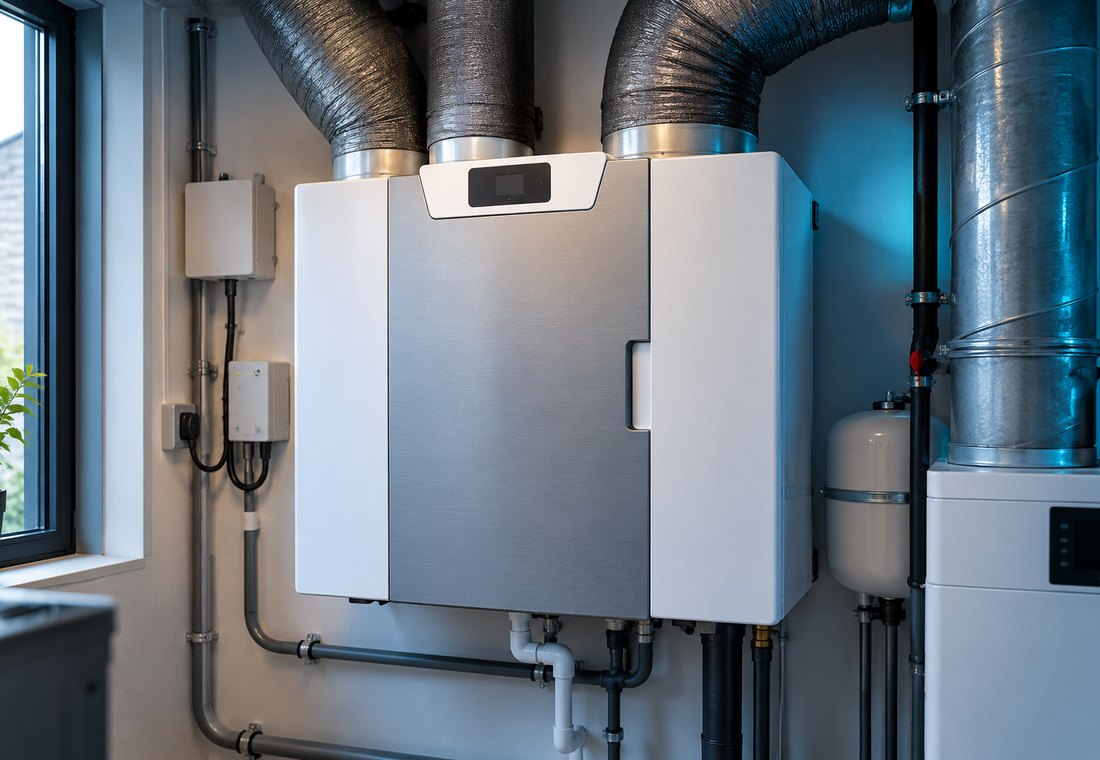
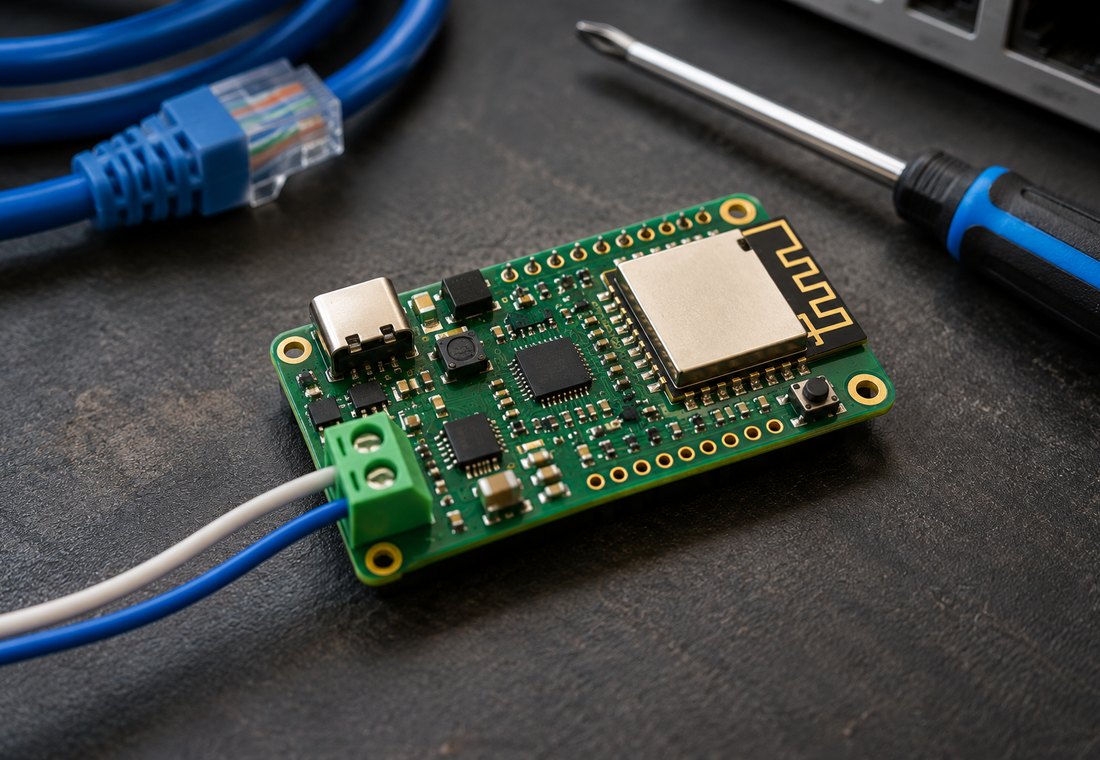
The eBUS ecosystem is best known for heating and control systems, but also includes systems with ventilation, solar collectors and heat pumps. These are example families, not universal compatibility promises.
| Brand / family | Known application | How certain is eBUSd support? |
|---|---|---|
| Vaillant | ecoTEC boilers, certain controllers and aroTHERM systems | Large community; exact controller and message definitions determine capabilities |
| Saunier Duval / Glow-worm / Protherm | Vaillant Group heating and controls | Occurs; check by model and region |
| Brink / ENCON | Among others Renovent Excellent and certain connected Elan systems | Community CSVs exist; type and addressing are critical |
| Wolf | Certain heating and ventilation controllers | Definitions exist; not every Wolf device uses the same bus |
| Weishaupt | Specific heating appliances/controllers | Appears in the eBUS configuration ecosystem |
| Other OEM / rebrands | Devices sharing controller boards or manufacturer platforms | Sometimes usable; nameplate alone is insufficient evidence |
Some ventilation products are also sold under names such as Ubbink or VisionAIR and other OEM labels. This does not imply identical firmware. An installation can also use more than one communication protocol.
What should you look for with each manufacturer?
With Vaillant, first ask whether the boiler or heat pump is actually connected to an eBUS controller. In some ecoTEC combinations, messages may expose flow temperature, hot-water demand, burner state and faults. For an aroTHERM heat pump, the interesting set differs: you may look instead at heat demand, flow and return, outside air, operating state and perhaps compressor or defrost status. Always confirm the fields exposed by your installation against its own CSVs.
With Saunier Duval, Glow-worm and Protherm, a common manufacturer background helps: some protocols and logic resemble Vaillant's. That does not justify assuming identical write commands. Wolf has both heating and ventilation applications. Weishaupt device identities are known in eBUS scans. Product version and firmware are decisive for these brands too.
In other words, do not ask only “does my brand speak eBUS?” Ask “which device address, definition and registers work on my exact version?”
What exactly does “supported” mean?
A device can physically speak eBUS while eBUSd lacks a usable CSV. Conversely, an available CSV does not mean every write command is safe or valid on every firmware version. Verify the combination of hardware, software, device and intended function. The official configuration repository and community issues are starting points; the device's service manual remains decisive for connections and safety. Sources 1–5
04. How do you check your device's suitability?
- Record the exact model number, serial-number range, year and, where possible, controller or board version.
- Find the installation manual and look for explicit terms such as
eBUS,X1 eBUS, and bus/controller connector. - Check the connector's function. RJ12 may be a speed selector; a two-wire terminal may instead be OpenTherm.
- Look for definitions for that manufacturer and product. Check issues and forks too, not just the project's title.
- Begin with reading only. Verify signal status, discovered participants and a few plausible values before ever writing.
Common mistake: a heat pump, boiler and ventilation unit in the same catalogue need not use the same protocol or telegrams. Even two visually identical connectors can have different pin assignments.
Why a simple ESP32 is not enough
An ESP32, D1 mini or Raspberry Pi does not automatically have the correct physical eBUS interface. The bus uses a specific electrical signal and timing, and multiple participants must not transmit arbitrarily at once. Suitable adapter hardware contains dedicated circuitry and logic. Connecting two appliance wires directly to GPIO is unsafe and can damage both the microcontroller and appliance.
Consider the adapter's enclosure and installation location too. A bare PCB beside a warm appliance with metal pipes is not ideal permanent mounting. A USB adapter beside a NUC is easier to manage, whereas Wi-Fi can be practical when the plant room is on another floor. A fixed DHCP reservation helps management but does not fix weak radio coverage. An adapter that drops its connection hourly causes more trouble than slightly older firmware that remains stable for months.
05. What hardware do you need?
A basic setup comprises a suitable eBUS interface, a host running eBUSd, and optionally an MQTT broker and Home Assistant. The adapter is necessary because an ordinary USB-to-serial converter does not independently implement eBUS's electrical layer or arbitration.
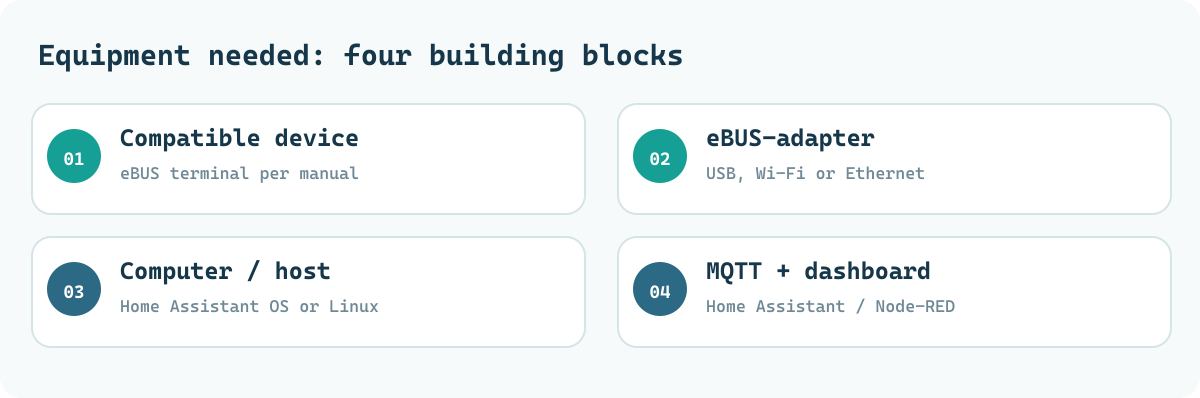
Which adapter type suits your situation?
| Choice | Strengths | Considerations |
|---|---|---|
| USB eBUS adapter | Simple; few network dependencies | Host must be within cable reach |
| Wi-Fi eBUS adapter | Place beside appliance while host is elsewhere | Reliable 2.4 GHz Wi-Fi and stable power desirable |
| Ethernet adapter | Predictable connection | Less common; sometimes needs extra module/power |
| Raspberry Pi/GPIO shield | Compact integrated setup | Check pin compatibility and power carefully |
Official eBUSd hardware documentation lists, among others, eBUS Adapter Shield v5 and C6 as well as older v3.x adapters. Newer C5 hardware is also offered by suppliers. Always check the current revision and required firmware. A direct UART connection without an appropriate eBUS interface is not a substitute. Source 2
What does it cost?
As a broad budget guide, an adapter with power supply and enclosure usually costs several tens to somewhat over a hundred euros, depending on version and supplier. If you already have a Home Assistant host and MQTT broker, additional software cost is normally zero. These are deliberately not current shop prices; check the seller and hardware revision before ordering.
06. Connecting safely to an eBUS installation
The eBUS connection is a low-voltage interface, but the appliance containing it may have 230 V or dangerous internal voltages. Isolate power according to the manufacturer before opening a cover or control panel. Do not work on a heating or ventilation appliance if you cannot confidently identify electrical separation and connector function.
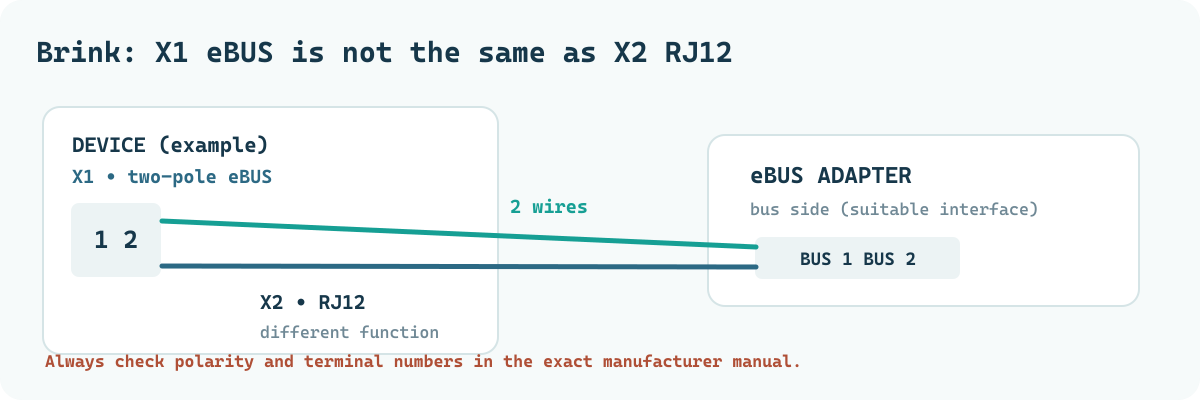
Five electrical rules
- Connect only to terminals explicitly designated eBUS in the correct device manual.
- On polarity-sensitive devices, confirm terminal orientation; do not assume eBUS is always non-polarised.
- Use a purpose-built adapter, preferably galvanically isolated. Power it according to the instructions for its revision.
- Keep eBUS wiring separate from mains wiring and place the assembly in a suitable enclosure.
- Leave the manufacturer control system intact; eBUSd must never bypass safeguards or disable emergency ventilation.
For certain Brink Renovent Excellent versions, the documentation describes the two-pole X1 as an eBUS/OpenTherm connection depending on model and settings. In several versions, RJ12 / X2 is used for speed selection or fan-speed control and is not a replacement eBUS terminal. The Elan E manual explicitly warns about polarity on its eBUS connection. Read the relevant manuals before connecting. Sources 6–7
07. Installing and configuring eBUSd
Home Assistant OS
On Home Assistant OS, install eBUSd as an app/add-on from a compatible repository. Mosquitto Broker is normally needed for MQTT discovery. With the standard broker, the app receives connection details through Supervisor; they need not be stored as plain text in YAML. Source 1
In eBUSd app 26.1.x, many older individual configuration fields are no longer shown separately: parameters belong in commandline_options. The following is an example using a reserved documentation IP address, not a ready-to-copy configuration:
network_device: enh:192.0.2.40:3335
seed_mqtt_cfg: true
commandline_options:
  - --configpath=/share/brink
  - --mqtttopic=ebusd
  - --pollinterval=10
  - --latency=10
  - --log=all:info
What does it mean? Here enh: indicates a supported network adapter in enhanced mode; the IP and port depend on the adapter. On first launch, seed_mqtt_cfg: true makes the app create a default MQTT discovery file and automatically applies --mqttjson and --mqttint. --configpath points to local CSVs. You need such a path only if your installation uses custom files; for standard devices you may use official online definitions. With local files and scanning disabled, the CSVs are loaded from the selected directory.
The related files might look like this:
/share/brink/
└── 3c.Excellent300.csv
Avoid duplicate CSV definitions. Two files with the same message ID can cause a duplicate entry error. Keep backups outside the configuration directory. In an existing installation, a manufacturer subdirectory should be present only if the chosen scan and loading strategy calls for it.
A first test
Open the app's web terminal and try:
ebusctl info
ebusctl scan result
ebusctl find -d -r
Use ebusctl info to inspect version, bus status, participants and counters. scan result shows discoveries from a scan, which may be limited without active scanning. find -d -r shows known read definitions. Only then try a known, safe read from your own configuration, for example:
ebusctl read -f -c Excellent300 BinnenTemperatuur
That last name is only a practical example for configurations in which Excellent300/BinnenTemperatuur actually exists. Other CSVs may use different field or circuit names. -f forces a bus read, so use it deliberately rather than in a fast loop.
08. How do CSVs, registers and eBUS messages work?
A raw eBUS telegram consists of addresses and bytes. eBUSd needs definitions to give those bytes meaning. Historically the project has used CSV files for this. A line describes, among other things, direction (r or w), circuit, message name, source and destination addresses, command bytes and fields with data type, scale and unit. Newer configuration workflows also support generation from TypeSpec sources. Sources 3–4
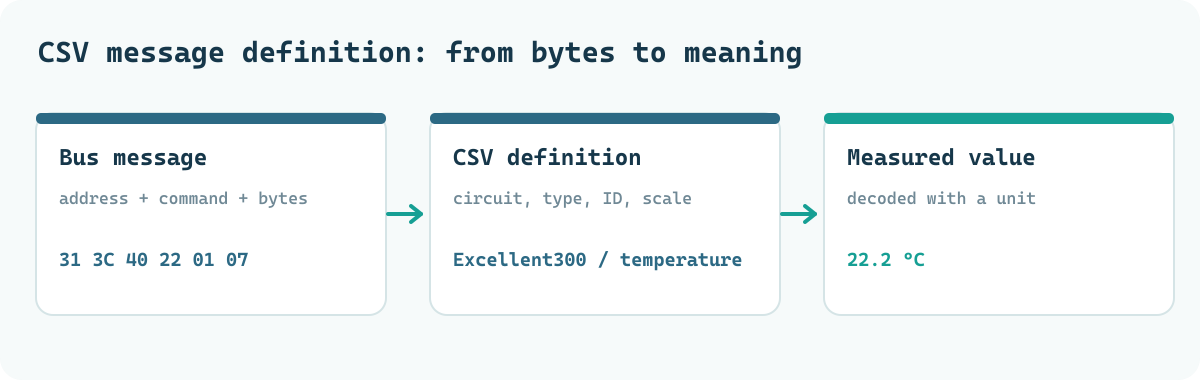
An illustration of the logic, not a copyable CSV line: a register named BuitenTemperatuur is readable, belongs to circuit Excellent300, has a known command ID and decodes two received bytes as a temperature in degrees Celsius. eBUSd may display the result as 16.1. Verify that definition for this exact appliance and firmware.
| Term | Meaning |
|---|---|
r |
Active read message as defined |
r1 through r9 |
Read message with polling priority |
w |
Write message; potentially risky |
circuit |
Logical group, such as Excellent300 |
QQ / ZZ |
Source and destination addresses of bus participants |
PBSB / ID |
Message identification |
datatype / divider |
Conversion to a readable value |
Polling versus updates: a read can be requested periodically; a passively observed telegram appears when a device sends it itself. More polling does not necessarily improve data: overly aggressive reads can load the bus. Start gently and monitor error counters.
Why temperature recording is valuable
A single outdoor temperature says little about a heat-recovery ventilation unit's performance. Ideally, compare outdoor, extract, supply and indoor air at the same time, accounting for the current bypass state. A temperature difference across the heat exchanger during stable winter operation can suggest something about heat recovery, but is not a certified efficiency measurement: airflows, humidity, sensor accuracy and fan heat affect the outcome.
A custom algorithm could save a trend value every fifteen minutes and recommend night cooling only after several readings show a favourable difference. Then a brief gust of wind or inaccurate sensor does not immediately change ventilation speed. Again, use only genuinely supported control routes and never override the manufacturer's frost or condensation strategy.
09. In practice: Brink Renovent Excellent
The Renovent Excellent 300/400 is a balanced ventilation unit with heat recovery. Relevant versions offer an eBUS connection. Community projects have documented registers for certain models, including temperature, fan values, bypass data and operating states. Availability varies by series, controller board and CSV used. Sources 5–6
Which data is useful?
| Data | Possible use |
|---|---|
| Indoor and outdoor temperatures | Night cooling, thermal trends |
| Supply/extract temperatures | Understanding heat-recovery performance |
| Bypass state / settings | See why the bypass is open or closed |
| Fan speed, RPM, airflow | Confirm that requested ventilation is actually delivered |
| Filter/fault status | Preventive maintenance and alerts |
| CO₂ inputs | Demand-controlled ventilation, if the sensor and register really work |
Practical observation: in one working Excellent configuration, eBUSd 26.1.8 successfully polled BinnenTemperatuur, BuitenTemperatuur, BypassStatus and BypassTemperatuur, among others. One installation reported 141 loaded message definitions. This shows that the configuration can decode telegrams, not that every definition works on every unit.
An effective approach to the bypass
A bypass can route outdoor air around the heat exchanger, but open does not always mean cooling. Warmer or more humid outdoor air may make the result disappointing. A sound Home Assistant algorithm combines temperature difference, season, indoor-temperature trend, hysteresis and minimum switching time. Keep the appliance's factory safeguards and humidity/frost logic in control. Use eBUS data to inform decisions, not to override safety limits.
10. Brink Elan: what uses eBUS, and what does not?
At Brink, distinguishing model generations is essential. The Elan E and Elan 4 cannot automatically be controlled in the same way. Elan E documentation describes an eBUS connection on X1 and a separate RJ12 X2 for speed control; there are also separate contacts for thermostat demand and special functions. For the Elan 4, Brink documents a connection to the Renovent Excellent over eBUS. Sources 7–8
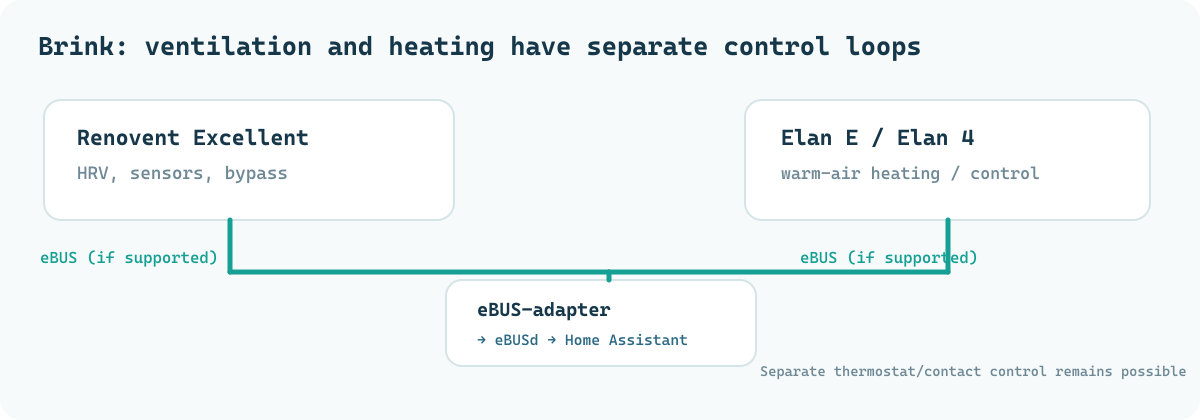
Crucially: an eBUS connector on an Elan E does not automatically mean that a complete, publicly available eBUSd register set exists for that model. In a combined system, eBUSd may read extensive Renovent data while Elan heating is still operated through thermostat contacts or its own controller. This is not an MQTT limitation; it depends on documented commands and device design.
What makes sense in a combined system?
- Keep heating demand and ventilation demand as separate Home Assistant functions.
- Use heat-recovery unit eBUS measurements for analysis and context.
- Control the Elan only through inputs permitted by Brink or demonstrably supported bus commands.
- Set priorities: frost protection, fault handling and normal ventilation must continue to work without Home Assistant.
A dashboard that really explains something
The most useful view is not necessarily the one with most sensors. Create three clear groups. Health: adapter online, signal status, active faults and last successful update. Ventilation: requested speed, measured RPM/airflow, bypass state and filter information. Comfort: indoor/outdoor temperature, CO₂, humidity and temperature trend. At a glance, you can then distinguish a surprising room reading caused by a measurement fault, changing outside air or a genuine appliance action.
Pay particular attention to entities' last_changed and update context. A sensor remaining at 22.2 °C for hours might genuinely be stable, or it might be showing a stale MQTT value. Check at least one sensor reasonably expected to vary over time and compare it with the current eBUSd log. A green MQTT icon only proves that the broker connection exists, not that every register is still being read correctly.
11. eBUSd, MQTT and Home Assistant
MQTT is the transport layer between eBUSd and Home Assistant. A suitable integration configuration translates available readings into MQTT topics and publishes discovery messages. Home Assistant creates sensors and perhaps controls from them, depending on the definition. MQTT Discovery does not guarantee that every known eBUS message becomes an entity.
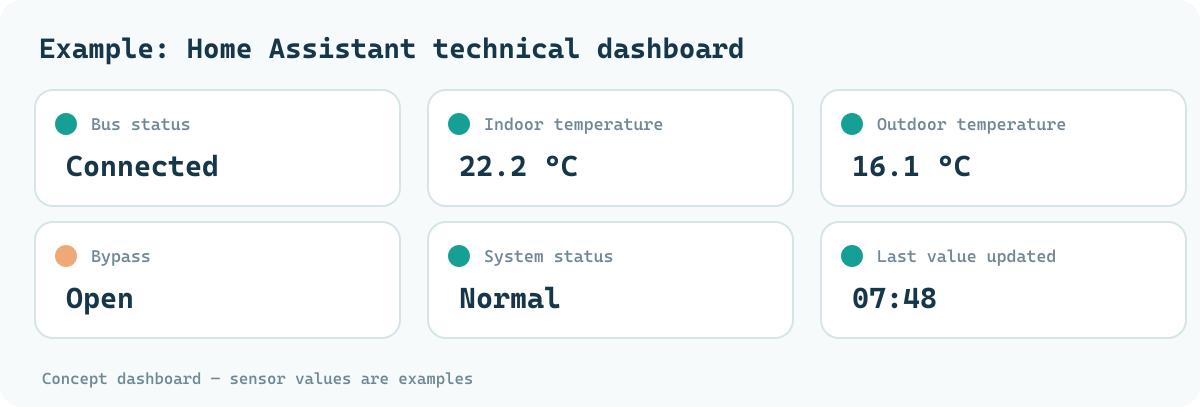
Manage entity IDs carefully. During migration, do not change the MQTT topic prefix, discovery configuration, CSV and device name all at once. A changed unique ID can create new entities and break existing dashboards or automations. Before and after an update, check entity counts, latest update times, availability and working historical measurements.
MQTT in practice
In a standard Home Assistant installation, the Mosquitto app supplies the MQTT network. eBUSd publishes decoded values to the configured topic, for example under prefix ebusd. Exact message structure depends on mqtt-hassio.cfg, --mqttjson and the eBUSd version. For control, do not blindly use a topic or payload found online; verify the active MQTT integration definition and write safeguards. Source 1
12. Seven useful automations
- Filter or fault alert: notify on a new, genuinely supported fault state.
- CO₂-based ventilation: raise ventilation through an authorised controller when a reliable CO₂ sensor has remained above the threshold long enough.
- Humidity-controlled bathroom: combine relative humidity with its rate of increase, avoiding unnecessary switching.
- Summer-night analysis: detect whether outside air could cool the house and check the bypass state.
- Fan monitoring: warn when requested speed disagrees with measured RPM, where that is available.
- Maintenance and running hours: compare runtime with filter schedule and real fault reports.
- Comfort dashboard: present temperatures, bypass state and air quality together.
Example: temperature alert in Home Assistant
The example below does not write to the bus. Replace the example entity with one actually available in your installation. Dutch example identifiers and message strings are preserved from the supplied code so they can be compared exactly with the original.
alias: WTW - onverwacht hoge inblaastemperatuur
triggers:
  - trigger: numeric_state
    entity_id: sensor.wtw_inblaastemperatuur
    above: 30
    for: "00:10:00"
conditions: []
actions:
  - action: notify.mobile_app_mijn_telefoon
    data:
      title: "WTW: temperatuurwaarschuwing"
      message: >-
        Inblaastemperatuur is gedurende 10 minuten
        hoger dan 30 °C. Controleer de WTW.
mode: single
The 30 °C threshold is only an example and must suit your installation and measurement location. For safety-critical signals, a Home Assistant notification never replaces an alarm or protection chain required by the manufacturer.
13. Going further with Python and AppDaemon
Python can reveal patterns that a simple automation struggles with: outdoor temperature gradually falling while a room still heats up, or an open bypass with too little cooling effect. An AppDaemon app can read existing Home Assistant entities and publish an advisory value without directly controlling the Brink.
# Schematisch voorbeeld: analyse, geen buscommando
inside = float(self.get_state("sensor.woonkamer_temperatuur"))
outside = float(self.get_state("sensor.wtw_buitentemperatuur"))
margin = 1.5  # voorbeeld: vereiste temperatuurmarge

cooling_opportunity = outside < inside - margin
self.set_state(
    "sensor.wtw_koeladvies",
    state="gunstig" if cooling_opportunity else "ongunstig",
    attributes={"friendly_name": "WTW koeladvies"},
)
This snippet is illustrative: it needs a proper AppDaemon app class, valid sensors, initialisation and handling of unknown/unavailable before being production-ready. A robust algorithm explains its decisions, uses hysteresis and minimum runtimes, logs changes and always has a safe fallback.
Practical extensions: derived temperatures in °C/hour, trends in bypass activation, traceable filters for poor readings, MQTT logging, InfluxDB history and anomaly detection. Machine learning is useful only after sufficient reliable training data exist and ordinary rules demonstrably fall short.
Diagnosing from the bottom up
For a fault, follow physical → adapter → protocol → definition → MQTT → dashboard. Begin with power, signal, connectors and Wi-Fi or USB. Then inspect ebusctl info: is eBUSd starting, is the signal acquired, and are reconnects limited? Read one known value with a safe read command. Only once that works should you inspect MQTT and the Home Assistant entity.
This also separates three versions of “no data”. An offline adapter cannot receive telegrams at all. A missing or incorrect CSV may see bytes but fail to turn them into a temperature. An MQTT discovery error can coexist with correct eBUSd measurements while no Home Assistant sensor appears. These require entirely different fixes.
14. Solving common problems
| Log line or symptom | Likely meaning | First action |
|---|---|---|
signal lost |
No usable bus voltage or signal | Check wiring, power and adapter signal |
transport closed |
Adapter transport interrupted | Check Wi-Fi/USB, power and reconnection |
connection opened 127.0.0.1 followed by closed |
Local client opens/closes a session | Normal during periodic status checks if the bus keeps working |
duplicate entry |
Two definitions use the same message ID | Compare CSVs; move copies outside the loading directory |
mqtt connection established, but no entities |
Broker works; discovery/definitions may not | Check mqtt-hassio.cfg, scanning and topics |
NotInitialized for CO₂ |
Sensor device state | Check whether the sensor is actually installed/configured |
found messages: N |
N known definitions | Do not confuse with N working Home Assistant sensors |
| Implausible temperature | Wrong scaling, byte order or sensor | Compare CSV with a real reference measurement |
A good diagnosis starts at the layer where the error occurs. Does the adapter page work? Is the eBUS signal present? Is the correct CSV loaded? Can ebusctl read a value? Is MQTT publishing? Does the value appear in Home Assistant? Testing each step prevents a single CSV problem from being blamed on Wi-Fi.
15. Safety, reliability and fail-safe operation
eBUSd can send active messages. Misuse is therefore riskier than passive monitoring. Do not disable boiler safeguards, write unknown registers or experiment with heat-pump compressor protection, defrost logic or safety setpoints. Manufacturer service menus exist for a reason.
Design principles for reliable control
- Start read-only: collect history and verify sensor values first.
- Make backups: CSVs, firmware version, app configuration and MQTT settings.
- Constrain writes: allowlists, minimum/maximum ranges, minimum switching times and emergency stop.
- Use one decision-maker: prevent two automations from constantly counteracting each other.
- Define failure behaviour: what happens if Wi-Fi, HA or eBUSd fails? The original appliance control must keep working.
- Limit exposure: adapter and eBUSd administration interfaces on trusted LAN/VPN only, not an open TCP port to the internet.
- Check physical safety: separate mains, follow the manual on polarity, route cables correctly and leave no bare uninsulated PCB in the enclosure.
When should you not start?
An eBUSd project takes time. If you cannot reach the correct connector, do not have the service manual and can access your device only through an unknown circuit board, waiting or finding an official integration is wiser. The same applies if your main goal is to influence a safety-critical function such as burner, frost or compressor protection. Those functions belong in the original control loop. A smart home may support it, not become its sole safety layer.
16. Is eBUSd worth it?
Yes, if you want technical insight and your device demonstrably has a suitable eBUS implementation. It can reveal much more about equipment that would otherwise remain a black box. If all you want is to raise a thermostat by one degree, an official manufacturer gateway or simple thermostat integration may be more practical.
| Solution | Advantages | Disadvantages |
|---|---|---|
| eBUSd | Deep data, local, open source, flexible MQTT integration | CSVs and compatibility demand research |
| Official manufacturer module | Tested functions, often supported | Cost, cloud dependency, less data |
| Modbus | Well-documented registers when manufacturer cooperates | Only on actual Modbus devices |
| ESPHome via relays/sensors | Straightforward for contacts, separate sensors and custom hardware | Does not automatically expose internal eBUS data |
| OpenTherm interface | Strong with compatible boiler/thermostat | Not a solution for an eBUS bus |
A stable system that does exactly what is needed is worth more than an experimental installation demanding attention every weekend. eBUSd's greatest practical value is therefore often insight and reliable diagnosis, not constant active writing.
17. Reference material and official sources
Useful commands
# Status van eBUSd en bus controleren
ebusctl info

# Resultaat van eventuele apparaatdetectie
ebusctl scan result

# Definities met extra informatie bekijken
ebusctl find -d -r

# Geforceerd één bekende Brink-waarde lezen
# Alleen als jouw CSV deze circuitnaam en berichtnaam bevat:
ebusctl read -f -c Excellent300 BinnenTemperatuur
Checklist before first use
- Exact appliance and official connection drawing identified.
- eBUS adapter hardware and firmware suitable for the bus.
- Terminal, polarity and power supply verified.
ebusctl infoshows stable signal and normal counters.- CSVs are unique and load without conflicts.
- First, three real sensors checked against a reference.
- MQTT discovery and entity IDs recorded.
- Fallback behaviour and backup tested before any writes.
Sources and further documentation
[1] LukasGrebe — eBUSd Home Assistant app, documentation and 26.1.x migration. Configuration options, MQTT discovery, local files and terminal.
[2] john30 — eBUSd Wiki: Hardware. Supported interface families and hardware versions.
[3] john30 — eBUSd Wiki: Message definition. CSV, field types and message identification.
[4] john30 — eBUSd configuration files. Community definitions and warnings.
[5] dstrigl — CSVs for Brink Renovent Excellent 300. Community project, not official Brink firmware support.
[6] Brink — Renovent Excellent 300/400 technical documentation. eBUS/OpenTherm, terminals and connection warnings.
[7] Brink — Elan E installation instructions. X1/X2 and safety.
[8] Brink — Elan 4 installation instructions. Example of eBUS link with Renovent.
[9] eBUSd Wiki: Integrations. MQTT, TCP and other interfaces.
[10] Daniel Kucera — ESP eBUS adapter firmware. Firmware and hardware dependencies.
The key point: understand first, control later
eBUSd makes system information visible, but the appliance determines what is possible and safe. With correct hardware, reliable definitions, MQTT and sensible automations, you can learn more from heating and ventilation equipment without losing sight of the original control system.
Editorial: MechScript.nl • October 2026 edition. The technical illustrations and atmospheric photographs were made for this article and show conceptual visualisations, not certified product or connection photographs. Always compare actual connectors, terminal numbers and wiring with manufacturer documentation.