

From ordinary TV sound to three-dimensional surround: audio codecs, HDMI return channels, the right connections and troubleshooting.
A film with a helicopter flying overhead, rain that seems to fall above you and a conversation in the middle of the room: good sound makes a film more convincing. But connect a television to a soundbar, game console, Apple TV or AV receiver and technical terms quickly pile up. Dolby Atmos, Dolby Digital Plus, TrueHD, PCM, bitstream, passthrough, HDMI ARC and eARC seem to be one thing, although they describe different parts of the same audio chain.
The essential distinction: Dolby Atmos describes three-dimensional sound reproduction; ARC and eARC determine how audio travels back over HDMI from the television to an external audio system. Atmos can be carried in several audio formats. Whether you actually hear it depends on the source, TV, audio equipment, connection route and settings. This article explains that entire chain. We use the LG OLED65GX6LA (2020 LG GX) as a practical example, but most principles apply to other brands too. [1][2][3]
Short answer: for most streaming services, Dolby Atmos carried by Dolby Digital Plus can work over a suitable HDMI ARC connection. For lossless Dolby TrueHD/Atmos and multichannel PCM or Dolby MAT routed through the television, eARC is generally needed. An eARC port does not guarantee that a TV supports or passes every audio format. [1][4]
Contents
- Why television sound has become more complicated
- From mono and stereo to 5.1, 7.1 and Dolby Atmos
- How Dolby Atmos works: channels, objects and metadata
- Atmos is not a codec: DD+, TrueHD and Dolby MAT
- What is HDMI ARC?
- What is HDMI eARC?
- ARC versus eARC at a glance
- PCM, bitstream, passthrough and HDMI-CEC
- The three most important connection diagrams
- Soundbar or AV receiver: which makes sense?
- Speaker layouts: 2.1, 5.1.2, 7.1.4 and upfiring speakers
- Streaming, UHD Blu-ray, Apple TV and consoles
- Cables, HDMI ports and optical audio
- Practical example: setting up the LG OLED65GX6LA
- Troubleshooting missing Atmos, delay and dropouts
- Common misconceptions
- Summary, checklist and sources
1. Why television sound has become more complicated
In the past, a VCR connected to a television with coaxial cable or SCART. Two audio channels were enough for stereo. Modern televisions are at once screens, streaming computers, HDMI switching centres and audio processors. They fetch films directly from Netflix or Disney+, accept signals from consoles and media players, and send audio to a soundbar.
That changes the division of labour. Which device decodes the sound? Should the television pass a Dolby stream through intact or convert it to PCM? Should the soundbar process its own audio signal? What happens if the TV has eARC but the receiver has only ARC?
An error at one link in the chain may go unnoticed. You may still hear sound, but only in stereo. Or an Atmos logo appears in a streaming app while the soundbar actually receives only Dolby Digital 5.1. Audible sound is not proof that the whole chain is working optimally.
2. From mono and stereo to 5.1, 7.1 and Dolby Atmos
Mono uses one audio channel. Stereo uses two, left and right. This can create a surprisingly spacious soundstage, but sounds behind or above the listener are not reproduced by separate channels.
In 5.1, there are three front speakers (left, centre and right), two surround channels and a separate low-frequency-effects channel (LFE), normally reproduced by a subwoofer. The centre speaker matters because much film dialogue is placed there. 7.1 adds two surround channels so the area diagonally behind the listener can be addressed more precisely.
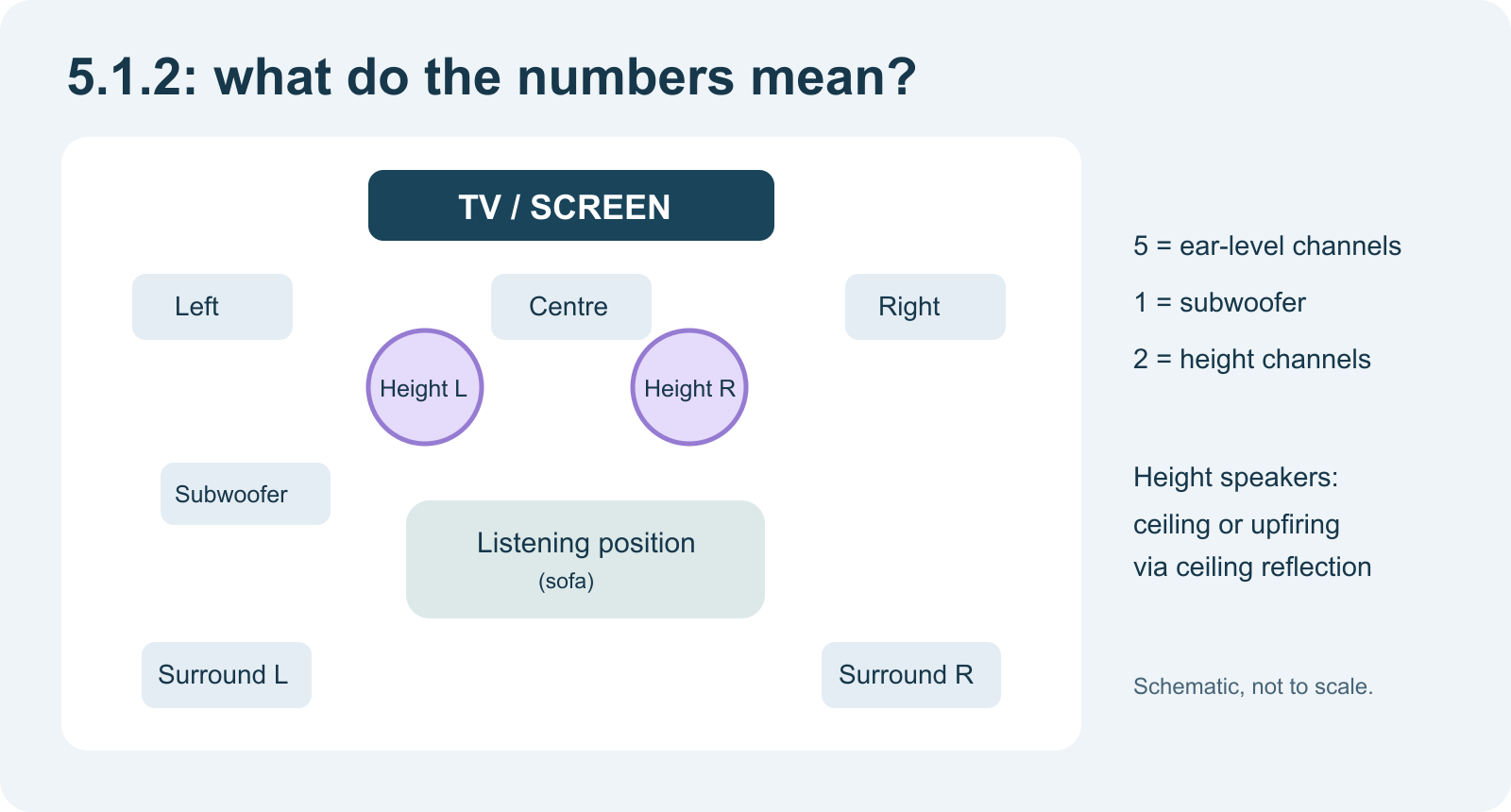
Dolby Atmos adds a height dimension and object-based reproduction. In a configuration such as 5.1.2, the numbers refer to five ear-level speakers, one subwoofer/LFE designation and two height channels. They do not specify the exact number of amplifiers or drivers inside a soundbar; manufacturers also use the notation for internal speaker groups. [2][5]
| Layout | Meaning | Typical use |
|---|---|---|
| 2.0 | Two speakers | Stereo, music, basic TV |
| 2.1 | Stereo with subwoofer | Compact living room |
| 3.1 | Left, centre, right and subwoofer | Clearer dialogue, front-oriented |
| 5.1 | Five ear-level channels and subwoofer | Traditional surround |
| 5.1.2 | 5.1 plus two height channels | Entry-level genuine Atmos layout |
| 7.1.4 | Seven ear-level channels, subwoofer and four heights | Extensive home cinema |
3. How Dolby Atmos works technically
In traditional surround sound, the mix largely determines which audio information goes to which channel. Dolby Atmos additionally lets an audio creator place audio objects in three-dimensional space. An object carries metadata about its position and movement, among other things. Playback equipment then calculates which speakers should reproduce it. [2]
Imagine a helicopter travelling from rear left over your head to front right. An Atmos mix can describe that movement much more flexibly than a fixed transfer among a handful of surround channels. Part of the soundtrack often remains a multichannel bed: a foundation of music, ambience and other elements. Objects complement it.
That does not mean every film contains hundreds of freely moving objects. The Atmos format supports complex object-based productions, but the actual mix depends on its creator. An ordinary stereo mix does not become object-based merely because a soundbar adds an Atmos effect.
Real height speakers versus virtual Atmos
There are roughly three ways to reproduce height:
- Ceiling speakers: separate speakers aimed at the listening position from above. Usually the most predictable approach.
- Upfiring speakers: speakers aim upward so the ceiling reflects sound back. The effect depends strongly on ceiling height, shape and reflectivity.
- Virtual Atmos: digital signal processing simulates height and surround impressions with fewer physical speakers. It can sound convincing but does not automatically replace a physical 5.1.2 layout. [5][6]
An important technical qualification: room acoustics matter as much as the audio logo. A symmetrical seating area, well-positioned centre and correctly set distances and delays can offer more benefit than replacing a sound 5.1 system with a cheap “Atmos” soundbar.
4. Dolby Atmos is not a codec: DD+, TrueHD and Dolby MAT
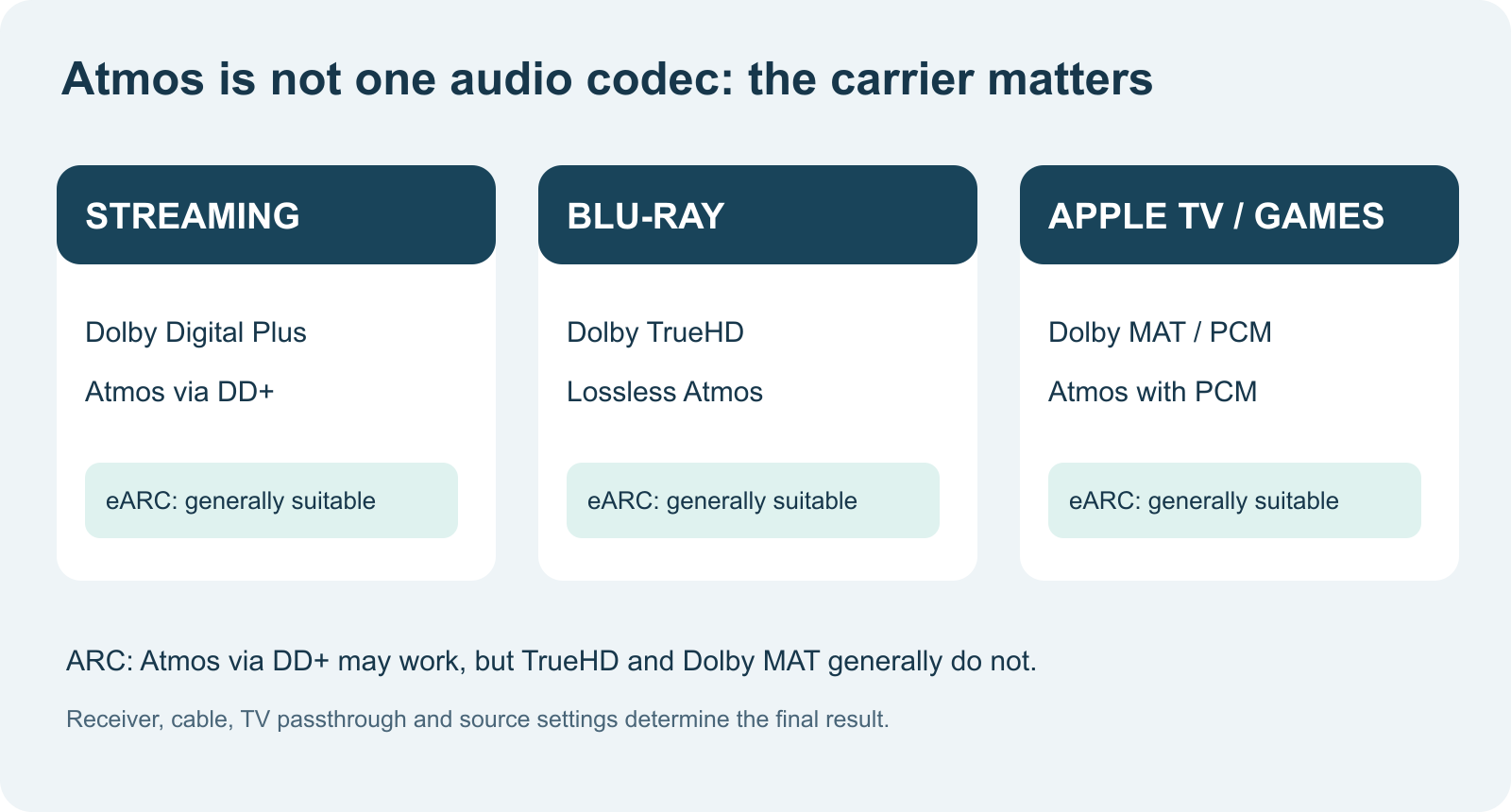
This is probably the most important distinction in the article. Dolby Atmos is not one particular compressed audio file. Spatial Atmos information can be carried in different transport formats. Three are especially common at home. [2][4][7]
Dolby Atmos via Dolby Digital Plus (E-AC-3)
Dolby Digital Plus is an efficient, lossy compressed audio format widely used for streaming. Compatible implementations can include Atmos metadata. The stream is relatively compact and fits the capabilities of many suitable HDMI ARC connections.
A common example is the Netflix app on a television connected over HDMI ARC to an Atmos soundbar. If the TV, app, subscription, selected film and soundbar all support the necessary features, Atmos can be available. eARC is not always necessary for this.
Dolby Atmos via Dolby TrueHD
Dolby TrueHD is losslessly compressed audio frequently used on Blu-ray and Ultra HD Blu-ray. A film can include Atmos metadata in that track. Its bitrate and amount of information are higher than with Dolby Digital Plus. If the Blu-ray player is connected through the TV and the audio must travel back to a receiver, eARC is normally the required route. Alternatively, connect the player directly to the receiver.
Dolby MAT: Atmos together with PCM
Apple TV 4K and some gaming platforms can send Atmos as Dolby MAT, a transport method combining multichannel PCM with relevant metadata. The source does not always have to transmit the original DD+ or TrueHD bitstream unchanged.
When the source is connected to the television first, this audio usually needs eARC or a direct HDMI connection to the receiver/soundbar. Apple explicitly confirms that its higher-bandwidth Atmos output cannot be passed through ordinary ARC. [8]
5. What is HDMI ARC?
ARC means Audio Return Channel. It was introduced in the HDMI 1.4 generation. Normally HDMI runs from a source to a TV. ARC adds a return path so the television can send audio back over the same HDMI cable to a soundbar or AV receiver. [1]
That is useful when the TV runs streaming apps itself or plays a connected source. Without ARC, an optical S/PDIF cable was often used to send the audio back. ARC makes that extra cable unnecessary in many setups.
ARC typically supports stereo PCM and compressed surround formats such as Dolby Digital 5.1. Compatible devices can also carry Dolby Digital Plus with Atmos via ARC. Support for that exact DD+ format is not universal: some older TVs convert it to Dolby Digital 5.1 or PCM. Check both devices' specifications.
The port must explicitly be marked ARC. An arbitrary HDMI input does not automatically become an audio-return port. On a receiver or soundbar you normally use HDMI OUT (ARC/eARC) to connect to the TV. “HDMI OUT” may sound contradictory, but audio-return traffic travels back over the same connector.
6. What is HDMI eARC?
eARC means Enhanced Audio Return Channel. It is the expanded return-audio feature standardised within HDMI 2.1. Audio bandwidth reaches approximately 37 Mbit/s, technically allowing multichannel uncompressed PCM, Dolby TrueHD/Atmos and suitable DTS-HD/DTS:X signals to be carried over a return connection. [1][9]
Besides higher bandwidth, eARC was designed for more robust audio-device negotiation and better lip-sync support. In practice, firmware, CEC, EDID and the way a device handles a source can still create compatibility problems.
A subtle but important point: eARC does not automatically mean HDMI 2.1 video or 48 Gbit/s. Manufacturers can implement eARC without the TV supporting 4K120, VRR or maximum HDMI video bandwidth. These are separate capabilities.
Likewise, two devices bearing an eARC logo do not automatically play every conceivable audio format. A manufacturer may, for example, omit DTS passthrough. eARC is the transport; decoding and passthrough are separate capabilities.
7. ARC versus eARC at a glance
| Characteristic | HDMI ARC | HDMI eARC |
|---|---|---|
| Generation | Introduced with HDMI 1.4 | Introduced with HDMI 2.1 |
| Main purpose | Return audio to receiver/soundbar | Return audio at much higher bandwidth |
| Stereo PCM | Yes | Yes |
| PCM 5.1/7.1 | Generally not | Yes, with compatible devices |
| Dolby Digital 5.1 | Usually yes | Yes |
| Dolby Digital Plus + Atmos | Possible, device-dependent | Possible |
| Dolby TrueHD + Atmos | Not over ordinary ARC | Yes, with compatible devices |
| Dolby MAT + Atmos | Not over ordinary ARC | Yes, with compatible devices |
| DTS-HD MA / DTS:X | Not over ordinary ARC | Technically possible; device support required |
| Audio bandwidth | Limited, suitable for compressed formats | Up to about 37 Mbit/s |
| Ease of use | May depend on HDMI-CEC | Improved eARC negotiation |
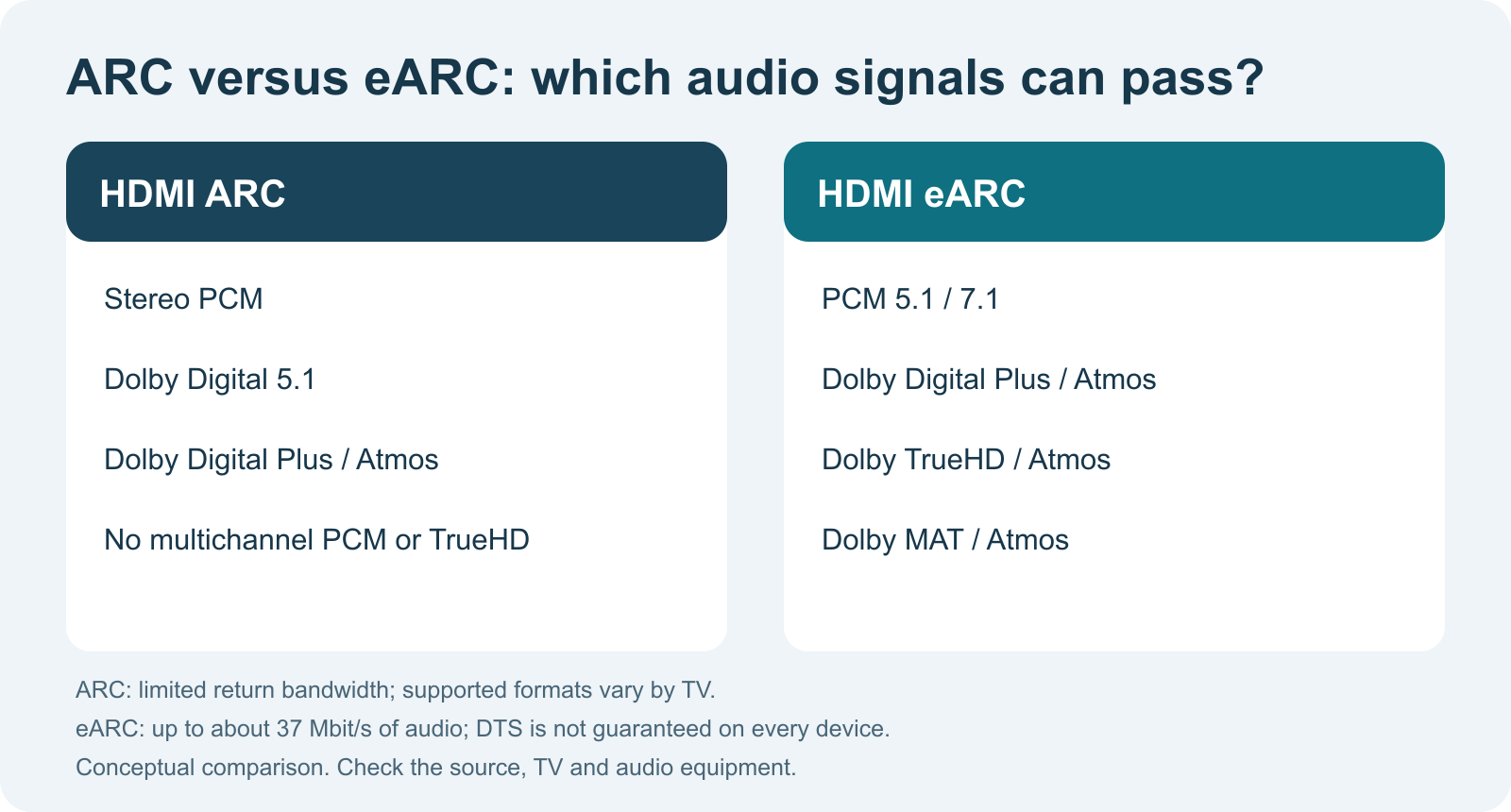
Upgrading a cable does not turn ordinary ARC into eARC. Both devices must support the feature. Some systems can use ARC and eARC and fall back to ARC, but do not assume that as universal backward compatibility without checking. [1]
8. PCM, bitstream, passthrough and HDMI-CEC
PCM
PCM stands for Pulse Code Modulation: decoded digital audio samples. Stereo PCM fits over almost all common digital connections. Multichannel PCM needs more bandwidth and is generally an eARC feature on a TV return connection.
If a TV is set to “PCM”, that does not automatically mean you get multichannel PCM. Some TVs reduce certain outgoing signals to 2.0 stereo. This often explains why every speaker appears to make sound through upmixing while the receiver never receives discrete 5.1.
Bitstream
With bitstream, the encoded audio stream goes to the device that can decode it: Dolby Digital, Dolby Digital Plus or Dolby TrueHD, for example. The receiver recognises the format and decodes it itself. Bitstream is not inherently “better”; the question is which device should process the audio and what each device supports.
Passthrough
With Pass Through, the television attempts to send the received audio-stream type to the audio device without unnecessary conversion. This is often a good first choice for a modern eARC soundbar or receiver. The TV may nevertheless have limits concerning codecs, sources or sample formats.
Auto
In Auto, the TV selects an output format based on the source and connected equipment. This can work perfectly well, but sometimes it transcodes to another surround format. If there are problems, compare Auto with Pass Through and inspect the format actually received by the receiver.
HDMI-CEC
CEC is a control protocol that lets devices exchange power and volume commands, for example. LG calls it SIMPLINK. CEC and ARC are often used together, but CEC is not the audio stream. eARC transport is less dependent on CEC than traditional ARC; CEC may still matter for remote control and automatic switching.
An advanced system usually works best when you know which device takes charge. With multiple sources and a receiver, letting the receiver switch may be better than allowing HDMI-CEC on every device to issue competing commands.
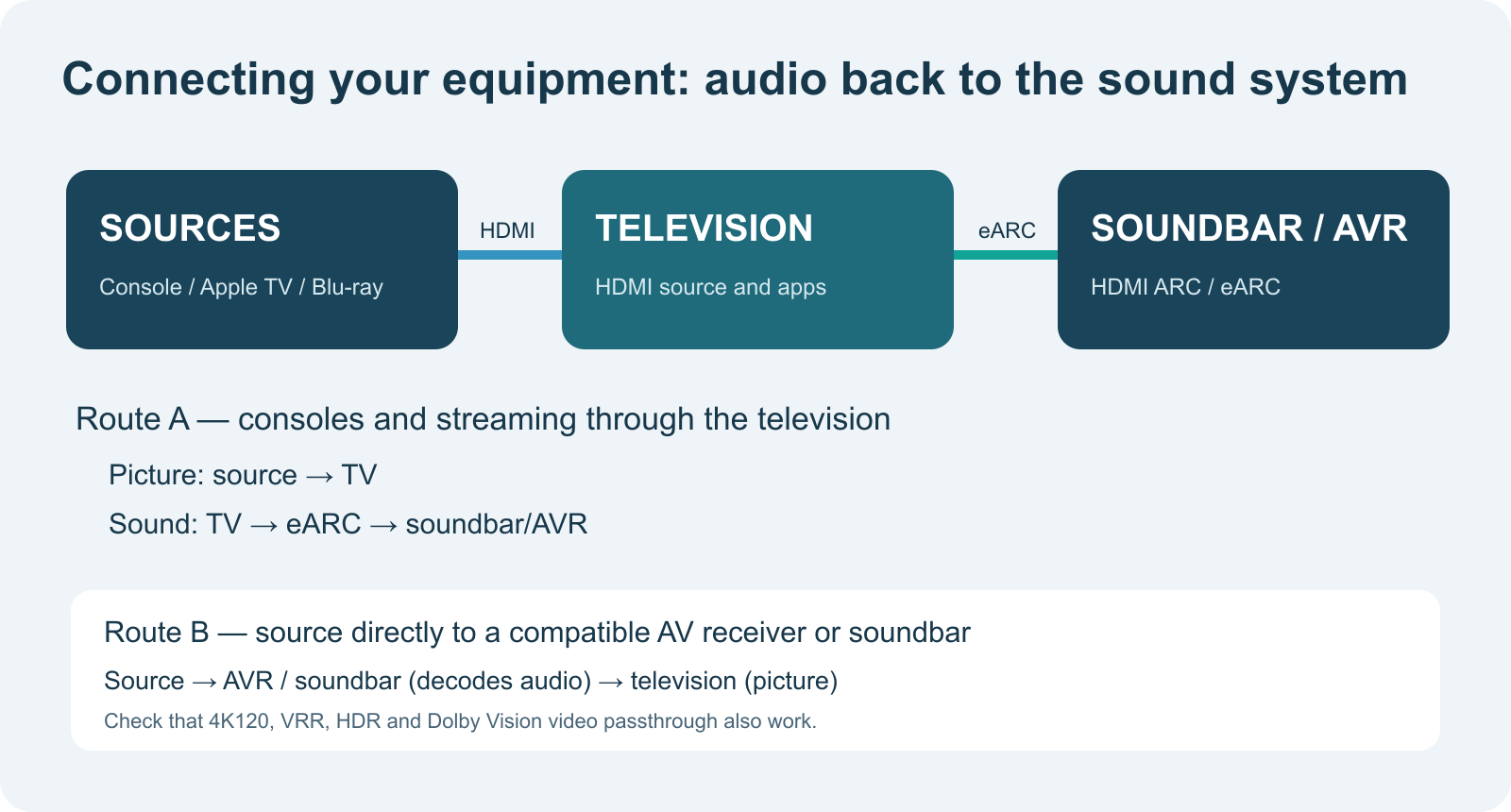
9. The three most important connection schemes
A. TV apps with a soundbar
The simplest configuration:
Netflix/Disney+ on TV → TV HDMI ARC/eARC → soundbar HDMI OUT (ARC/eARC).
The TV sends audio from its own apps back to the soundbar. If the app offers Dolby Atmos via DD+ and the equipment supports it, this can work even over ARC. For eARC, use the correct eARC port on both devices.
B. Console or Apple TV connected to the television
Console/Apple TV → ordinary TV HDMI input → TV eARC HDMI connection → soundbar/receiver.
This is attractive when the TV has strong HDMI video features but the audio system has older video technology. The TV can receive 4K120, VRR and HDR directly from the console while eARC carries the sound. Passthrough support is not equally good in every combination; check Dolby MAT, PCM 5.1/7.1 and the codecs used.
C. Source connected directly to the AV receiver
Blu-ray player/media player → AV receiver HDMI IN → receiver HDMI OUT → television.
This is generally the most reliable route for complex audio formats because the receiver gets the source directly. The limitation then shifts to video: the receiver must also pass 4K120, VRR, Dolby Vision or whichever video features you need. If it cannot, route B may be better.
10. Soundbar or AV receiver: which makes sense?
A soundbar is compact, easy to install and combines several small speakers in one enclosure. With a separate subwoofer and wireless rear speakers it can sound impressive. But the “Dolby Atmos” label does not tell you how many real sound channels are present. A simple virtual-Atmos soundbar may support the same codec as an advanced 5.1.4 layout without offering the same positioning precision.
An AV receiver with separate speakers usually offers more flexibility in speaker placement, room correction, subwoofer integration and upgrades. A good 5.1 system may subjectively sound better than a poorly placed 5.1.2 system. The desired result depends on room acoustics, listening distance, neighbours and budget.
Judge in this order: (1) intelligible dialogue and front balance, (2) bass, (3) surround coverage and only then (4) height. Atmos can add a great deal, but it cannot repair poor basic sound.
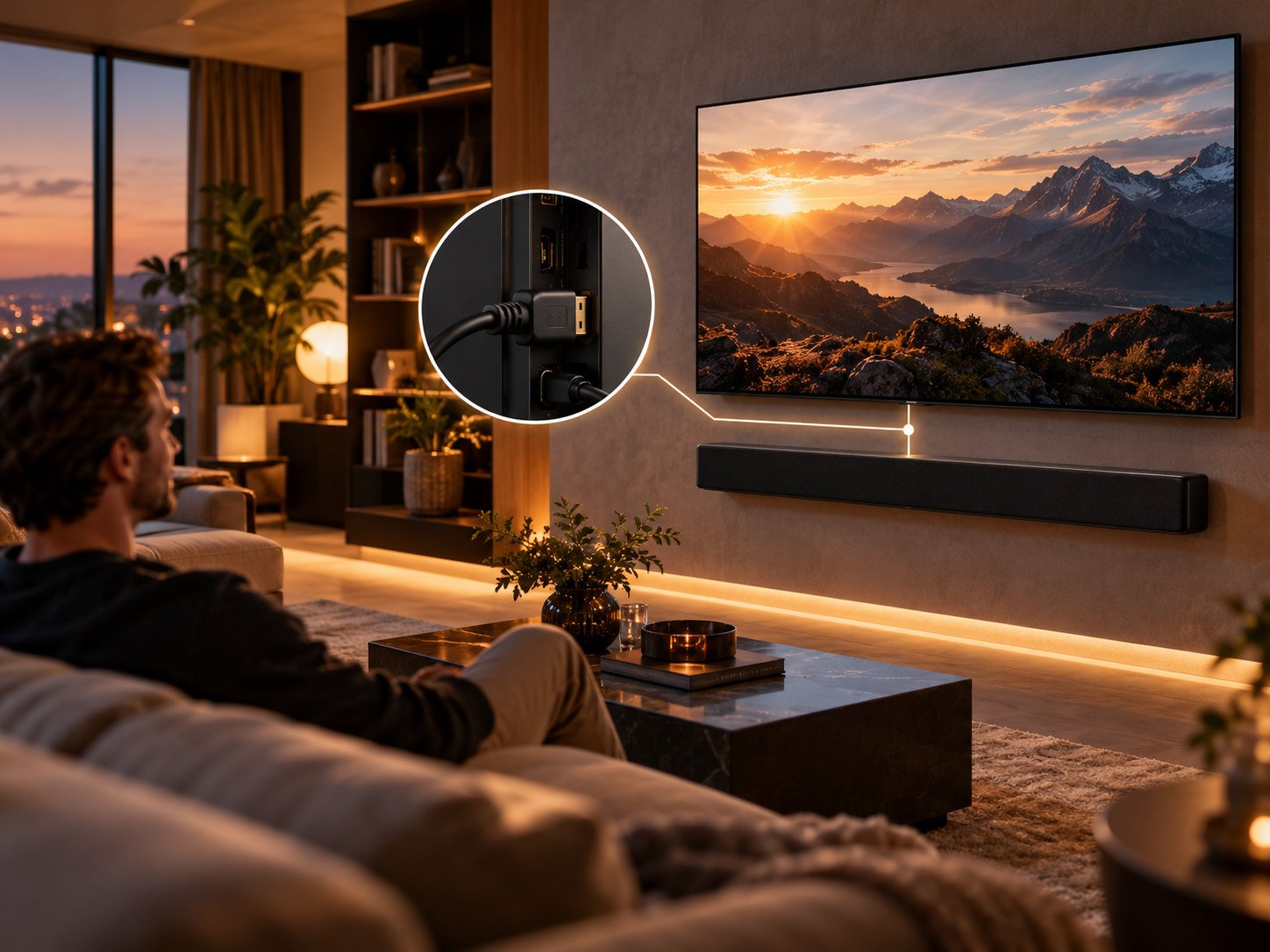
11. Speaker placement is more than a speaker count
Setting up 5.1.2 properly
Aim the front-left and front-right speakers toward the listening position. The centre should be as close as possible to the middle of the TV. Surround speakers are ideally a little to the sides or behind the seating area, not all at the front. Height channels should follow the relevant setup guidance above the listening area or use ceiling reflections. [5]
For upfiring speakers, a flat, reasonably reflective ceiling works best. A very high, sloping or strongly absorptive ceiling makes the effect less predictable. Dolby describes a suitable ceiling height of about 2.3 to 4.3 metres as a practical range for many upfiring setups. Keep tall cabinets and decorations away from the area directly above upward-firing elements.
Thick carpeting reduces reflections, usually helping overall acoustics. Height effects created by ceiling reflection, however, need a useful reflective ceiling. Listen to the whole room: the goal is not maximum reverberation but clear localisation without distracting reflections.
Why the centre speaker may matter more than Atmos
People watching films and series are often more bothered by hard-to-understand dialogue than by missing helicopters overhead. A proper centre channel with room correction can have a greater effect than a device merely simulating height. An unsuitable dynamic-range-compression setting can also put dialogue at a disadvantage relative to explosions.
12. Streaming, UHD Blu-ray, Apple TV and consoles
Streaming services
Most Atmos streams from services such as Netflix use Dolby Digital Plus as the base. Not every film, episode, audio language or subscription tier offers Atmos. Netflix requires a suitable plan, compatible equipment and an eligible title. [10]
Streaming audio bitrate is generally much lower than a TrueHD track on disc. It would be wrong to infer that streaming necessarily sounds bad. Modern audio codecs use bandwidth efficiently; the mix, speakers and acoustics are often more audible factors than bitrate alone.
UHD Blu-ray and personal media files
A UHD Blu-ray can carry Dolby TrueHD with Atmos. Many discs also contain other languages or alternative audio tracks. Media players that support original audio bitstreams can send them to a compatible AVR. Passing them through a TV requires eARC and a TV that actually passes that particular stream. For DTS-HD or DTS:X, the second condition may be especially troublesome.
Apple TV 4K
Apple TV 4K can output Atmos as Dolby MAT. To retain the best available audio format, use a compatible eARC route or connect the Apple TV directly to a receiver or soundbar with a suitable HDMI input. Apple recommends a direct route for many home-cinema setups; also check full video passthrough. [8]
PlayStation, Xbox and gaming PC
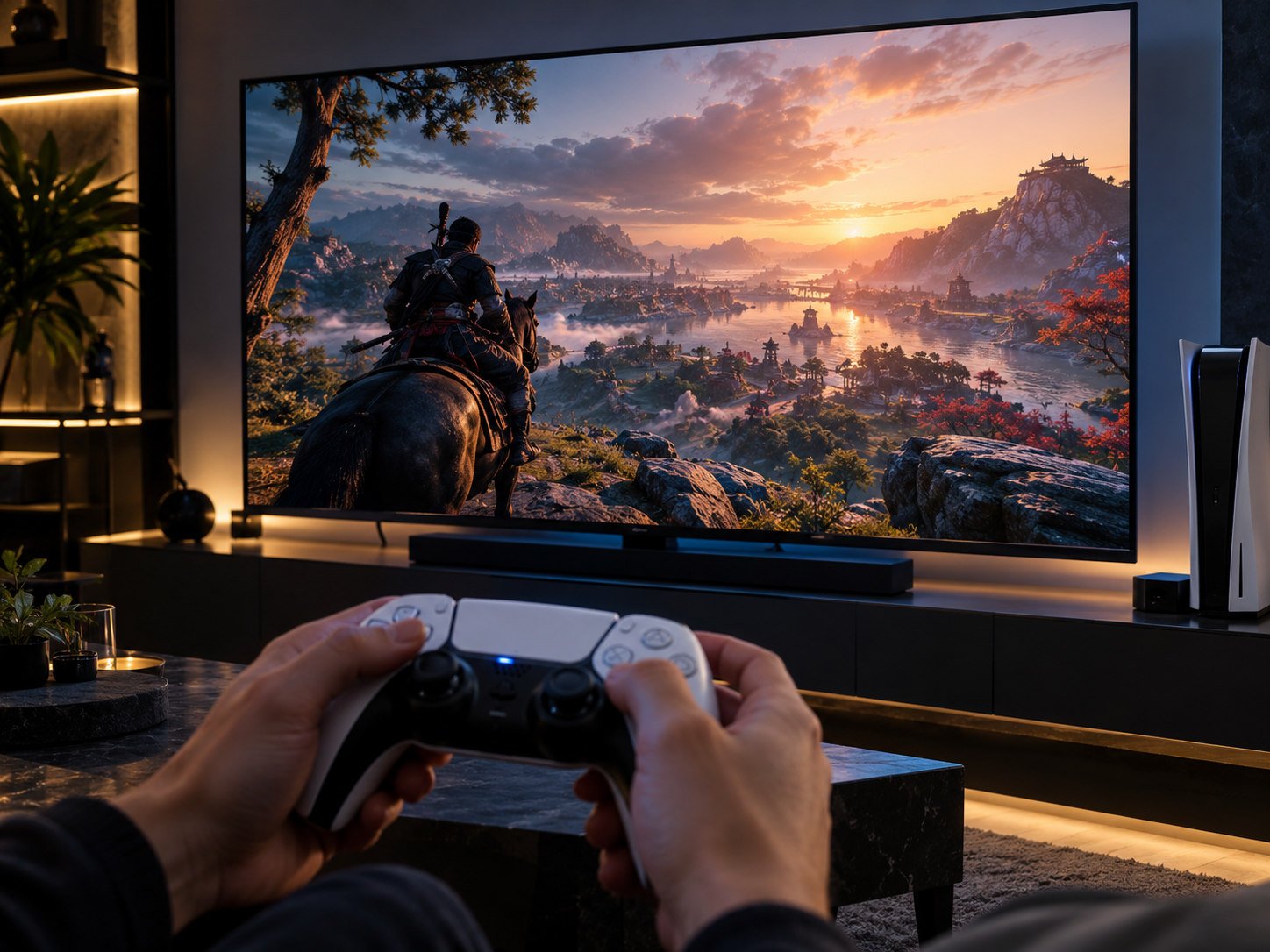
Gaming brings video and audio requirements together. A console can send 4K120/VRR to the TV while producing multichannel or object-based audio. If the receiver does not support the latest video modes, connect the console directly to the TV and use eARC for audio.
Check whether the selected game actually offers Atmos, how the console's audio output is set and what format the receiver reports. A game supporting “surround” is not automatically a genuine Atmos mix. Also watch for extra processing delay when audio is converted more than once.
13. Cables, HDMI ports and optical audio
Which HDMI cable do you need?
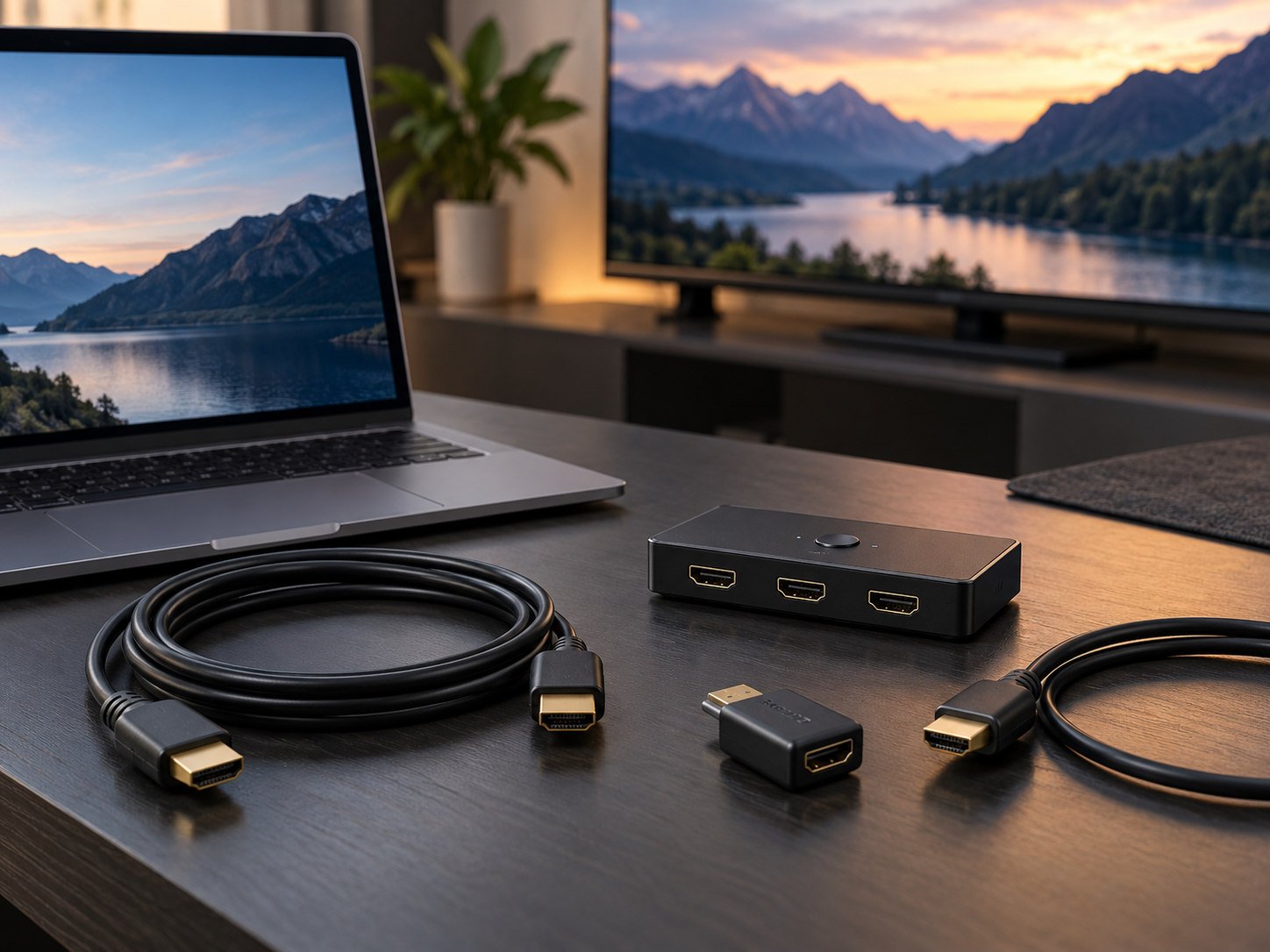
HDMI is digital. An expensive cable with gold-plated marketing claims does not make a valid audio signal “warmer” or “more spacious”. What matters is correct electrical transmission, a reliable connector and a cable suitable for the desired speed and functions.
For a new installation, a certified Ultra High Speed HDMI Cable is a safe choice, especially if the same cable also carries 4K120 video. Some older High Speed with Ethernet cables can also carry eARC without problems, but that is not the same as formal eARC certification. [1][11]
Take extra care with long cable runs or active/optical HDMI cables: they may be directional and not every active product supports ARC/eARC return traffic. Check explicitly before putting a cable inside a wall.
Why not simply use an optical cable?
An optical S/PDIF connection is still useful for stereo PCM and common compressed surround formats such as Dolby Digital 5.1. But it is not intended for multichannel PCM, Dolby TrueHD/Atmos or the usual streaming-Atmos-over-DD+ return path. For Atmos, HDMI ARC or eARC is generally the right choice.
If you have a DTS track and the TV does not support DTS, an optical cable will not magically solve that either. The source may need to go directly to a compatible decoder or receiver.
14. Practical example: LG OLED65GX6LA (GX, 2020)
The LG OLED65GX6LA supports Dolby Atmos on the TV and has HDMI eARC on HDMI 2. The television has four HDMI inputs. It can therefore still be a useful central switch for streaming, UHD Blu-ray and modern game consoles. LG explicitly identifies the HDMI 2 eARC position in its model specifications. [3]
Baseline settings with an external Atmos soundbar or receiver
| Component | My recommended starting setting |
|---|---|
| Physical connection | LG HDMI 2 (eARC) → soundbar/AVR HDMI OUT eARC/ARC |
| Audio output | HDMI ARC / external audio system |
| eARC support | On if connected equipment supports eARC |
| Digital sound output | Pass Through as first choice |
| SIMPLINK / HDMI-CEC | On if controls and device recognition require it |
| Alternative for compatibility problems | Try Digital Sound Output = Auto |
| Sources with TrueHD/Dolby MAT | Via eARC or directly to a suitable receiver |
| Sources with DTS | Preferably directly to a decoder/AVR |
Menu layout may vary by firmware or region. Under All Settings → Sound → Sound Out, look in additional sound settings for eARC Support, Digital Sound Output and SIMPLINK. The 2020 webOS wording may differ from newer LG models. Pass Through is my starting recommendation, not a guarantee that all source devices will negotiate correctly at once. [3][12]
Important caveat: no DTS on the GX
LG dropped DTS support from its 2020 OLED televisions. RTINGS also specifically reports a lack of DTS decoding for the GX. You therefore cannot simply rely on TV passthrough for a DTS, DTS-HD or DTS:X source despite eARC's technical bandwidth. Connect a DTS media player or Blu-ray player directly to a DTS-capable receiver, or choose a compatible Dolby/PCM track. [4]
This makes the difference between transport capability and format support tangible: the eARC port can have enough bandwidth while the software chain still does not support a particular format.
What if you have no external audio system?
The GX supports Dolby Atmos processing through its built-in speakers. That is a form of spatial processing, but a separate soundbar or multichannel system has the advantage in physical source separation and bass depth. If you are happy with the internal sound, there is no reason to buy an HDMI cable just for those built-in TV speakers.
15. Troubleshooting: a structured method
| Symptom | Likely cause | What to check |
|---|---|---|
| No sound from soundbar | Wrong HDMI port or sound output | ARC/eARC at both ends; external TV sound output |
| Sound, but only stereo | PCM 2.0 or TV transcoding | Pass Through/Auto, source output, receiver information |
| Netflix has no Atmos logo | Title, language, plan or device | Audio track, app, subscription, audio chain |
| Apple TV has no Atmos over ARC | Dolby MAT requires more bandwidth | eARC or direct HDMI to AVR/soundbar |
| TrueHD is silent | ARC rather than eARC, or incompatibility | eARC on, correct port, source-audio information |
| DTS track is silent on LG GX | GX lacks DTS support | Source directly to DTS receiver or another track |
| Sound lags behind picture | Processing delay / lip-sync | Audio delay, passthrough, source configuration |
| Soundbar switches unexpectedly | CEC/SIMPLINK conflict | HDMI-control settings and device order |
| Audio drops out intermittently | Handshake, firmware, cable or active HDMI run | Short certified cable and device updates |
Troubleshooting steps
- Identify the source format. Is it stereo, Dolby Digital 5.1, Atmos via DD+, TrueHD/Atmos or Dolby MAT? Use the source or receiver's information screen.
- Identify the physical route. Does the source go to the TV first or directly to the receiver? This determines which ports and passthrough functions matter.
- Check the right HDMI port. On the LG GX, HDMI 2 is for eARC; another TV may use a different input.
- Test a simple source first. Start with stereo, then Dolby Digital 5.1, before trying TrueHD/Atmos.
- Compare Pass Through and Auto. Use the receiver's incoming-audio display, not just an Atmos logo in a streaming app.
- Remove intermediate links. Test source → receiver directly if you want to determine whether the TV is the limiting factor.
- Update firmware, but change only one setting at a time. Then you can identify what actually solved the problem.
Why lip-sync can be difficult
Audio and video do not always take the same processing route. Picture enhancement in the TV, different decoders and wireless surround channels can introduce delay. eARC improves lip-sync negotiation compared with ARC, but manufacturers cannot prevent every combination from being configured incorrectly. Start with the receiver or TV's native audio-delay setting and avoid applying the same correction twice.
16. Eight common misconceptions
“I need eARC for Atmos.” Not always. Atmos via Dolby Digital Plus can work with compatible ARC devices. TrueHD/Atmos or Dolby MAT routed through the television generally does require eARC.
“An Atmos soundbar always sounds better than 5.1.” No. Speaker count, acoustics, adjustment and driver quality matter.
“An expensive HDMI cable produces better bass.” No. A certified, properly functioning digital cable is what matters.
“My TV has eARC, so every audio codec works.” No. The LG GX's DTS limitation is one example.
“PCM is always stereo.” PCM can be multichannel; ordinary ARC generally cannot carry that, but compatible eARC equipment can.
“Dolby Atmos is always lossless.” No. Streaming often uses lossy Dolby Digital Plus; discs can use TrueHD with Atmos.
“The app shows Atmos, so my receiver gets Atmos.” Not necessarily. Check the audio format actually received by the audio device.
“eARC improves video quality.” No. It improves the audio return connection, not the panel's picture processing.
17. Conclusion: build one good audio chain
If you mainly use Netflix and other streaming services with a suitable soundbar, HDMI ARC can often serve you well. When you need uncompressed multichannel audio, Dolby TrueHD/Atmos, Dolby MAT or a more elaborate home cinema, eARC becomes an important feature.
The best connection route is not always the one with the fewest cables. Connect a source directly to the AV receiver when doing so avoids TV limitations while retaining the video features you need. If the receiver is older and cannot pass 4K120/VRR, connect straight to the TV and use eARC instead.
For the LG OLED65GX6LA, a practical baseline is to connect the soundbar or receiver to HDMI 2 (eARC), enable eARC when needed, start with Pass Through and test with known audio sources. For a DTS library, prefer a direct route to a compatible receiver. Set the system up logically once and you should rarely have to revisit it.
Practical checklist
- Check what the source actually sends: stereo, DD+, TrueHD or Dolby MAT.
- Use the marked ARC/eARC HDMI ports at both ends.
- Choose a reliable, suitable HDMI cable.
- Set the TV to HDMI audio output and enable eARC where appropriate.
- Compare Pass Through with Auto and read the incoming format on the receiver.
- Check codec limitations, especially DTS and older devices.
- Set speaker distances, levels and bass management correctly.
- Judge Atmos only with content known to have a real Atmos track.
Sources and further reading
[1] HDMI Licensing Administrator – Enhanced Audio Return Channel: https://www.hdmi.org/spec21sub/enhancedaudioreturnchannel
[2] Dolby Professional – Dolby Atmos for the Home: https://professional.dolby.com/tv/home/dolby-atmos/
[3] LG – OLED65GX6LA specifications: https://www.lg.com/uk/tvs/oled-tv/oled65gx6la/
[4] RTINGS – LG GX OLED, audio passthrough and DTS: https://www.rtings.com/tv/reviews/lg/gx-oled
[5] Dolby – Dolby Atmos Speaker Setup: https://www.dolby.com/about/support/guide/dolby-atmos-speaker-setup/
[6] Dolby – Dolby Atmos for Sound Bar Applications: https://professional.dolby.com/siteassets/tv/home/dolby-atmos/dolby-atmos-for-sound-bar-applications.pdf
[7] Dolby Professional – Dolby Digital Plus: https://professional.dolby.com/technologies/dolby-digital-plus/
[8] Apple Support – Dolby Atmos with a soundbar or AV receiver: https://support.apple.com/nl-nl/102310
[9] HDMI Licensing Administrator – More Sound with HDMI Technology: https://www.hdmi.org/blog/detail/177
[10] Netflix Help – Dolby Atmos: https://help.netflix.com/nl/node/64066
[11] HDMI Licensing Administrator – Cable types: https://www.hdmi.org/resource/cables
[12] LG – Sound output and digital audio settings: https://kr.eguide.lgappstv.com/manual/w19_mr/dvb/Contents/settings/sound/soundout_e_a_t/eng/w45__settings__sound__soundout_e_a_t__eng.html